




If you run a home or small-shop DTF setup, uptime is your profit engine. This printable DTF maintenance checklist is anchored to a midrange 13–24" rollfed unit with automatic white ink circulation (1–2 printheads) operating in a spareroom or homestudio environment. It also flags what changes for manual or mixed fleets. Times are realistic ranges, not absolutes—always follow your OEM’s procedures and approved fluids.
As of 2026, many rollfed models include auto white circulation and scheduled selfcleans. Use that automation, but verify it. Think of this guide as your gonogo preflight that keeps heads healthy, lines moving, and waste low.
DTF maintenance checklist quick decision matrix
|
Scenario |
What changes |
Time impact |
|
Printer has auto white circulation and timed selfclean |
Keep power on per OEM; confirm schedules before first job; skip manual bottle agitation unless idle >24–48 hours |
Saves ~2–4 min daily |
|
Manual or sheetfed with no circulation |
Gently agitate white before first job; run nozzle test and short purge after long idle; wet cap overnight in dry seasons |
Add ~5–10 min daily; +10–20 min weekly |
|
Home studio below 40% RH |
Prefer wet capping on manual fleets; raise RH near print path before production |
Add ~2–5 min to preflight |
|
Heavy production week |
Do the weekly deep clean midweek as well |
+15–25 min midweek |
Daily DTF maintenance checklist
Baseline: midrange 13–24" roll DTF with auto white circulation in a home studio. For manual fleets, follow the “Manual variant” note where shown.
|
Task |
Supplies |
Minutes |
Go or nogo |
Failsafe |
|
Verify environment at printpath height |
Hygrometer and thermometer |
1 |
40–60% RH and 70–80°F |
If out of range, adjust humidifier or dehumidifier before printing |
|
Run nozzle check before first job |
Builtin nozzle pattern |
1–2 |
Pattern fully solid |
If gaps remain after one auto clean, pause and inspect cap seal and wiper before a second clean |
|
Confirm or trigger whiteink circulation if idle long |
Device panel, autocirculation |
0–1 |
Lines show no air |
If air present, prime or purge per OEM and retest pattern |
|
Wipe residue around cap and wiper if visible |
Lintfree swabs, OEMapproved cleaner, nitrile gloves |
2–3 |
No pooled ink; straight wiper edge |
If residue persists, bring forward the weekly deep clean |
|
Endofday idle strategy |
Wetcap fluid for manual fleets |
1–2 |
Heads sealed, automation left enabled if equipped |
If RH <40%, wet cap manual fleets and limit drafts near the printer |
Manual variant: add 2–4 minutes to gently agitate white before first print. After >48 hours idle, run a short purge and a fresh nozzle test before production.
Weekly DTF maintenance checklist
Perform at end of week, or sooner after heavy output or visible residue.
|
Task |
Supplies |
Minutes |
Go or nogo |
Failsafe |
|
Deepclean capping station and ink guide |
Swabs, OEM cleaner, small syringe, gloves |
10–20 |
Even cap seal, normal suction |
If suction weak, inspect or replace cap pad and seals; verify waste line is clear |
|
Clean wiper blade and reseat |
Lintfree wipe, OEM cleaner |
5–10 |
Clean, straight wiper edge |
Replace if frayed or warped |
|
Clean encoder strip and media path |
Isopropyl alcohol 70%, lintfree swabs, HEPA minivac, antistatic wipe |
5–10 |
No smudges, smooth carriage travel |
If banding persists, check platen height and pinchroller tension |
|
Empty waste tank and dust exterior fans and covers |
Shop towel, minivac |
5–10 |
No overflow risk, clear airflow |
If odors or residue persist, review curing airflow and filters |
Manual variant: expect +10–20 minutes for more frequent manual cleans.
Monthly preventive checklist
Schedule a longer window. Document parts and dates.
|
Task |
Supplies |
Minutes |
Go or nogo |
Failsafe |
|
Inspect or replace wiper, capping pad, filters, dampers |
Spare parts kit, gloves, cleaner |
60–120 |
New or clean parts, steady flow |
If flow restricted, replace filters early and prime lines before printing |
|
Check alignment, firmware, and fan filters |
Service panel, tools |
15–30 |
Uptodate firmware, stable alignment |
If drift continues, inspect belts and bearings and realign |
Intervals vary by use and ink system; log changes to spot patterns.
Quarterly scheduled downtime
Use this for deeper inspection and housekeeping.
|
Task |
Supplies |
Minutes |
Go or nogo |
Failsafe |
|
Inspect belts and bearings, lubricate if applicable; deep dust removal; document findings |
Basic tools, PPE, HEPA minivac |
120–240 |
Smooth motion, minimal debris |
Escalate to service if recurring anomalies persist after maintenance |
Environment and storage targets for home studios
Aim for 40–60% relative humidity and 70–80°F at the print path and keep readings stable. Roland DGA notes 20–28°C with about 50% RH for DTF operation, which aligns with this target range; see the guidance in the 2025 article on why the environment matters for DTF and how to stabilize it in small spaces in the resource titled Roland DGA on environment matters with DTF printing. For cadence and daily habits like nozzle tests, whiteink movement, and wet capping, industry training materials echo the same themes; a clear, vendorstyle summary appears in the 2025 support article Ricoma maintenance by daily weekly and monthly cadence.
Place a hygrometer at printpath height within arm’s reach of the carriage, not at the doorway or across the room. Store adhesive powder sealed with desiccant and keep PET film flat or vertically in sealed bins; condition both to room climate before use to reduce static and clumping.
Troubleshooting miniguide and escalation
Start with the simplest, least invasive fixes and avoid stacking repeated auto cleans.
- Nozzle gaps after one clean: pause, inspect the capping seal and wiper; manually clean the station; allow a 5–10 minute dwell, then retest. If still gapped, perform a targeted manual clean per your OEM.
- Air visible in white lines: stop jobs and prime or purge to clear bubbles; confirm the circulation cycle runs as scheduled; retest before production.
- Banding that survives encoder cleaning: verify platen height and pinchroller tension; check feed rollers and run alignments.
- Weak suction at the cap: replace the pad or seals and confirm the waste line is open; test pump function if issues persist.
Keep a simple log of events, time spent, and parts replaced. That record pays for itself when patterns emerge.
Supplies and spare parts BOM
|
Item |
Purpose |
Reorder cadence |
|
Lintfree swabs and wipes |
Head and station cleaning |
Monthly or as used |
|
OEMapproved cleaning solution and distilled water |
Safe residue removal |
Keep one spare bottle |
|
Hygrometer and thermometer |
Verify RH and temperature |
One per machine area |
|
Nitrile gloves and safety glasses |
PPE for cleanup |
Keep stocked |
|
Small HEPA minivac and antistatic wipes |
Media path and enclosure dust control |
Inspect weekly |
|
Spare wiper blade and capping pad or seals |
Restore clean edges and suction |
Wiper 3–6 months; cap 3–6+ months |
|
Ink filters and dampers |
Maintain flow |
Filters 2–4 months; dampers 3–8 months |
|
Desiccant packs and sealed containers |
Powder and film storage |
Refresh each quarter |
Practical example using an automation baseline
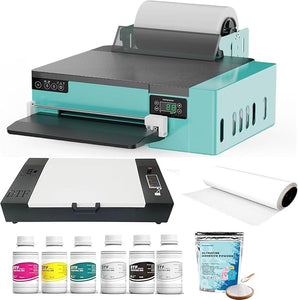
On a rollfed unit with automatic white circulation and timed selfclean, the daily routine is mostly verification. You confirm the environment, run a nozzle check, and ensure circulation ran after any long idle. That keeps handson time to around five to ten minutes on a typical day. As an illustrative example of such features, see the product information describing automatic whiteink circulation and selfclean on the Punehod L1800 rollfed DTF printer page. Always confirm actual schedules in your device panel and follow your OEM’s procedures.
Printable maintenance log template
Use this table beside the machine to track cadence, time, and anomalies.
|
Date |
Task |
Operator initials |
Notes and anomalies |
Time spent |
|
|
|
|
|
|
|
|
|
|
|
|
|
|
|
|
|
|
Next steps
Compare maintenance features and automation across models on the Punehod DTF printer collection page, and adapt this DTF maintenance checklist to your specific device.